The screen and the keys
What you see, what each key does, how to transmit
The main screen
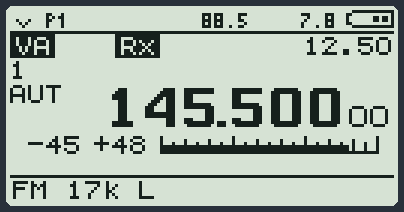
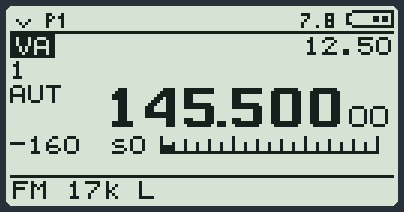
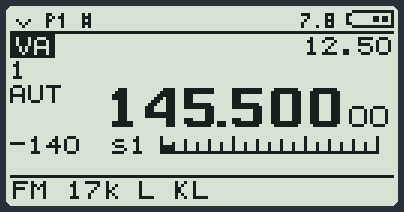
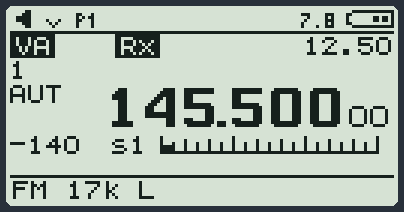
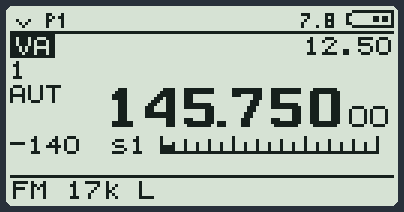
When you switch the radio on you see this screen. It is called VFO: it is the place where you choose the frequency.
| Where | What you read | What it means |
|---|---|---|
| Top left | a small symbol and P1, P2, P3 or PT | How the VFOs are set up and how you transmit. P1: the normal PTT. PT: PTT as a switch (toggle), you press it once to transmit and once more to stop. P2 and P3: with two or three VFOs the side keys also work as PTT (see Two or three frequencies together). |
| Top right | 7.8 and the battery | The battery voltage in volts and how full it is. When it is empty the battery symbol blinks. |
| Below, on the left | VA inverted | The VFO you are using: A, B or C. |
| Below, on the right | 12.50 | The step: how many kHz you jump with the arrows. |
| On the left | 1 | The squelch. |
| On the left | AUT | Who sets the gain: AUT = automatic. |
| In the middle, big | 145.500 00 | The frequency in MHz. The two small digits are the tens of hertz. |
| Under the frequency | -140, s1 and the bar | How strong the incoming signal is. |
| At the bottom | FM 17k L | The mode (FM), the bandwidth (17 kHz) and the power (L low, M medium, H high). If the power is missing, you cannot transmit on that VFO. |
In the top line some small codes also appear when you turn something on:
| Code | It means |
|---|---|
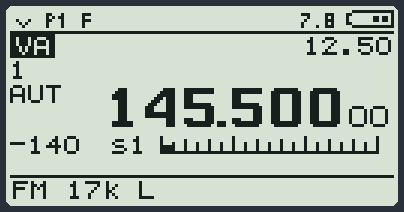
| F | You pressed F: the next key will do its second function. |
| # | The keys are locked. |
| a loudspeaker | The monitor is on: you also hear the hiss. |
| Sc | The scan is running. |
| Vx | VOX is on. |
| I | The 8.33 kHz aircraft channels are on. |
| N | The noise filter is on. |
| PS | The radio is saving battery. |
| 88.5 or D023N | The sub-tone the radio has recognised in the person talking (you need the Tone Scan module). |
| PDL, BCN and others | A module is working in the background (the paddle, the beacon...). |
The rules of the keys
| We say | It means |
|---|---|
| short | Press and let go at once. |
| long | Hold down until something happens (about half a second). |
| F + key | Press F and let it go. F appears at the top. Then press the other key. They must not be pressed together. You have a second and a half. |
| F + key long | Press F, let it go, then hold down the other key. |
Typing a frequency
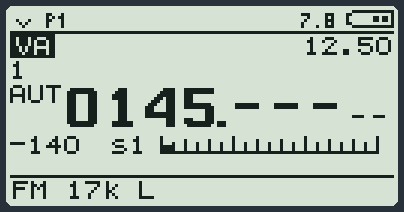
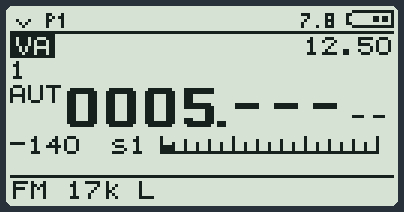
- Press the digits one after the other. For 145.500 MHz: 1 4 5 5.
- Press MENU to confirm: the radio adds the missing zeros. If you type all the digits the radio confirms by itself.
- * works as the decimal point: you need it for low frequencies. For 5.000 MHz press 5 and then *.
- Made a mistake? EXIT short deletes the last digit. EXIT long drops everything.
All the keys when you are in frequency mode
This table is taken straight from the firmware. An empty box means that key, pressed that way, does nothing.
| Key | Short | Long | F + short | F + long |
|---|---|---|---|---|
| 0 ... 9 | types the frequency (see below) | - | - | - |
| 0 | - | quick-opens MODE (the mode) | turns the FM radio on or off (music, from 76 to 108 MHz) | opens the SMS module |
| 1 | - | quick-opens Rx AGC | opens the list of bands (bandplan, Preset module) | same as F + short |
| 2 | - | goes to the next VFO (A, B, C) | changes how many lines you see: 1, 2, 3 VFOs | turns the watch on all the VFOs on screen on or off |
| 3 | - | switches from free frequency to memory channels, and back | - | - |
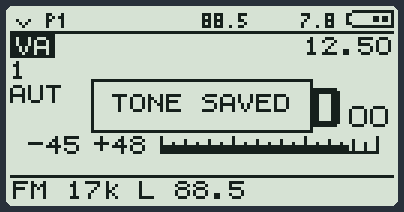
| 4 | - | quick-opens RFGain | saves the frequency in the first free memory channel (Add Mem CH-...) | saves on the VFO the sub-tone the radio has just recognised (TONE SAVED). You need the Tone Scan module |
| 5 | - | quick-opens BW (the bandwidth) | turns the compander on or off | turns the noise filter on or off (NoiseB) |
| 6 | - | changes the power: LOW, MID, HIGH | turns transmitting on or off (Txp EN) | opens the FastScan module (with 2 or 3 VFOs on screen: FS Multiband) |
| 7 | - | opens the Parrot module | opens the Parrot module | same as F + short |
| 8 | - | reverse: you listen on the frequency where you usually transmit (to hear who is coming into the repeater) | turns the upconverter on or off (only if UpConv is not OFF) | turns the scrambler on or off |
| 9 | - | quick-opens STEP (the step) | - | jumps to the favourite channel (1 Call) |
| * | adds this frequency to the SCList list | starts the scan (any other key stops it) | opens the FastScan module (with 2 or 3 VFOs on screen: FS Multiband) | starts the scan of only the frequencies in the SCList |
| F | "arms" the F key for a second and a half: the next key does its second function. F appears at the top | locks or unlocks the keys. # appears at the top | - | - |
| MENU | opens the menu | - | opens the Calls module on the code to call | opens the call contact list (D List, Calls module) |
| EXIT | rounds the frequency to the step | resets this VFO: it goes back to FM with the basic values and removes the preset name | - | - |
| UP | the frequency goes up one step (held: it runs) | same as short, running | marks the UPPER scan limit on this frequency | same as F + short |
| DOWN | the frequency goes down one step (held: it runs) | same as short, running | marks the LOWER scan limit on this frequency | same as F + short |
| side key 1 | squelch one higher | monitor: opens the audio even with no signal (again to close) | opens the list of presets (Preset module) | opens the SCList list |
| side key 2 | squelch one lower | quick-opens M Bank (the bank) | opens SetVFO (how many VFOs) | - |
| PTT | transmits as long as you hold it down. In CW it is the Morse key | - | with one VFO on screen: PTT as a switch, one press to transmit and one to stop (at the top PT). With two or three VFOs: the side keys become PTT (at the top P2 or P3). Press again to go back as before | - |
Also: while you transmit by voice, holding side key 2 sends a tone (usually 1750 Hz, to open old repeaters).
All the keys when you are on the memory channels
You go from frequencies to memory channels with 3 long. Almost everything stays the same; what changes is written in bold.
| Key | Short | Long | F + short | F + long |
|---|---|---|---|---|
| 0 ... 9 | types the memory channel number (see below) | - | - | - |
| 0 | - | quick-opens MODE (the mode) | turns the FM radio on or off (music, from 76 to 108 MHz) | opens the SMS module |
| 1 | - | quick-opens ChGroup (which groups to see) | quick-opens M Bank (the bank) | same as F + short |
| 2 | - | goes to the next VFO (A, B, C) | changes how many lines you see: 1, 2, 3 VFOs | turns the watch on all the VFOs on screen on or off |
| 3 | - | switches from free frequency to memory channels, and back | - | copies the memory channel to the VFO: you can move from there with the arrows |
| 4 | - | quick-opens RFGain | tells the scan to skip (or not skip) this memory channel | saves the recognised sub-tone |
| 5 | - | quick-opens BW (the bandwidth) | turns the compander on or off | turns the noise filter on or off (NoiseB) |
| 6 | - | changes the power: LOW, MID, HIGH | turns transmitting on or off (Txp EN) | opens the FastScan module (with 2 or 3 VFOs on screen: FS Multiband) |
| 7 | - | opens the Parrot module | opens the Parrot module | same as F + short |
| 8 | - | reverse: you listen on the frequency where you usually transmit (to hear who is coming into the repeater) | turns the upconverter on or off (only if UpConv is not OFF) | turns the scrambler on or off |
| 9 | - | quick-opens STEP (the step) | puts this memory channel in a group | jumps to the favourite channel (1 Call) |
| * | adds this frequency to the SCList list | starts the scan (any other key stops it) | opens the FastScan module (with 2 or 3 VFOs on screen: FS Multiband) | starts the scan of only the frequencies in the SCList |
| F | same as on the VFO | locks or unlocks the keys | - | - |
| MENU | opens the menu | - | opens the Calls module on the code to call | opens the call contact list (D List, Calls module) |
| EXIT | nothing | - | - | deletes this memory channel |
| UP | next memory channel (held: it runs) | same as short, running | - | - |
| DOWN | previous memory channel (held: it runs) | same as short, running | - | - |
| side key 1 | squelch one higher | monitor: opens the audio even with no signal (again to close) | opens the list of presets (Preset module) | opens the SCList list |
| side key 2 | squelch one lower | quick-opens M Bank (the bank) | opens SetVFO (how many VFOs) | - |
| PTT | transmits as long as you hold it down | - | - | - |
The two side keys
They are the two small keys on the side, under the PTT. From the factory they do this:
| Key | Short | Long |
|---|---|---|
| Side key 1 | squelch higher (SQL +) | monitor |
| Side key 2 | squelch lower (SQL -) | list of presets |
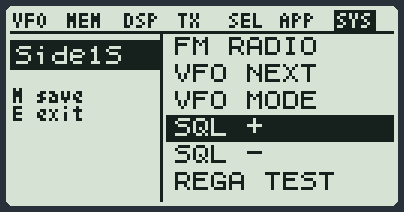
You can give them another job from the menu, group SYS, items Side1S, Side1L, Side2S, Side2L. Here is everything you can choose:
| Action | What it does |
|---|---|
| NONE | nothing |
| FLASHLGHT | turns the torch on and off (radios with the classic Si4732 board do not have it: it answers N/A) |
| TX POWER | changes the power: low, medium, high |
| MONITOR | opens the audio even with no signal |
| SCANNER | starts the scan |
| FM RADIO | turns the FM radio with music on and off |
| VFO NEXT | goes to the next VFO |
| VFO MODE | changes how many lines you see (1, 2, 3 VFOs) |
| SQL + | squelch higher |
| SQL - | squelch lower |
| REGA TEST | sends the REGA test call (five tones) as soon as the channel is free (Calls module) |
| REGA ALRM | sends the REGA alarm call, preceded by your code, as soon as the channel is free (Calls module) |
| PRESET | opens the list of presets |
| AGC MAN | quick-opens Rx AGC |
| CH LIST | quick-opens ChGroup |
| PHONEBOOK | opens the call contact list (D List, Calls module) |
| CW CALLCQ | sends CQ CQ in Morse (you need the Beacon module). In CW it sends the carrier, in FM a note |
| VOX | switches the VOX on and off, with the level chosen in the VOX item of the menu |
| FASTSCAN | opens the FastScan module |
| FCOPY | opens the FCopy module: it finds the frequency and the sub-tone of a radio that is transmitting nearby |
| SCRAMBLR | turns the scrambler on and off |
| UPCONV | turns the upconverter on and off |
| COMPAND | turns the compander on and off |
| NOISE BLK | turns the noise filter on and off |
| TX ENABLE | turns transmitting on and off |
| VFO/MEM | switches from free frequency to memory channels |
| MEM>VFO | copies the memory channel to the VFO |
| MEM SAVE | saves the frequency in a memory channel |
| MEM DEL | deletes the memory channel |
| MEM GROUP | puts the memory channel in a group |
| 1 CALL | jumps to the favourite channel |
| FREQ REV | repeater reverse |
| DW/TW | turns the VFO watch on and off |
| HF BAND | opens the list of bands |
| FAST MEM | starts the FastScan on the memory channels |
| RSSI TRK | opens the FastScan in RSSI Track mode (the tone that goes up when the signal is stronger) |
| SMS MENU | opens the menu of the SMS module |
| SMS LIST | opens the list of messages (SMS module) |
| SMS WRITE | opens the writing of a message (SMS module) |
| REPLY REQ | opens the REPLY REQ item of the SMS module |
| SMS KRX | opens the KEY RX item of the SMS module |
| SMS KTX | opens the KEY TX item of the SMS module |
| SMS CW | opens the SMS CW item of the SMS module |
| STEP + | frequency up one step |
| STEP - | frequency down one step |
| MENU | opens the menu |
| RNG MIN | marks the lower scan limit |
| RNG MAX | marks the upper scan limit |
| BANK | quick-opens M Bank |
Locking the keys
Hold down F: # appears at the top and the keys do nothing any more. PTT still works. Hold down F again to unlock. If you want them to lock by themselves after 15 seconds, set KeyLok to AUTO in the SYS menu.
Two or three frequencies at once (multiwatch)
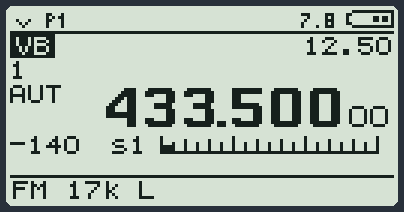
The radio has three VFOs: VA, VB and VC. You can see one, two or three of them, and have them all watched.
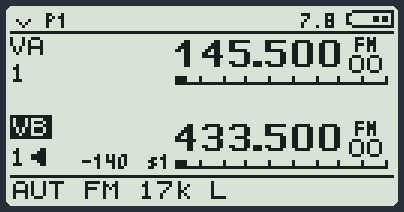
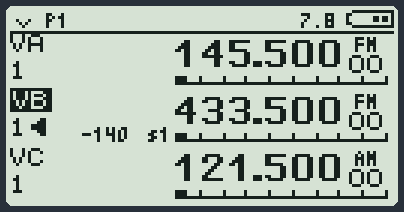
- F and then 2: you change how many lines you see. One, two, three, and then one again.
- 2 long: you go to the next VFO. The one you are using has its label inverted.
- F and then 2 long: you turn the watch on. The radio looks at all the lines in turn and stops where someone is talking. Rx appears on the line that is receiving.
- To choose exactly how it behaves, open SetVFO (DSP menu, or F and then side key 2).
| SetVFO | What it does |
|---|---|
| 1 VFO, 2 VFO, 3 VFO | You see one, two or three lines. You listen only to the one you are using. |
| DW LOCK | Two lines watched. PTT always transmits on the VFO you chose. |
| DW LINK | Two lines watched. When one receives, the radio moves to that one: if you answer, you talk there. |
| TW LOCK, TW LINK | As above, with three lines. |
| SPLIT | You listen on one VFO and transmit on the other. |
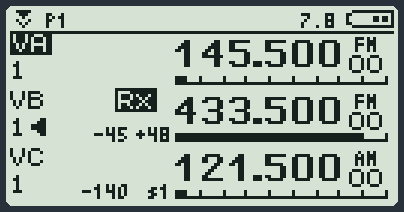
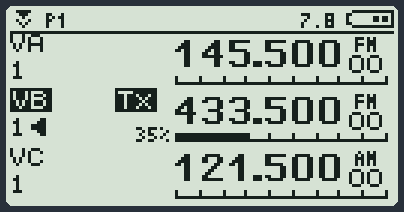
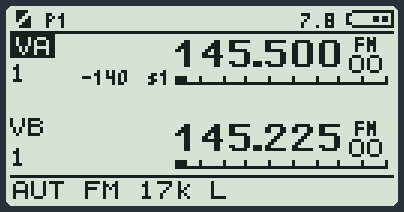
Transmitting
Hold down PTT and talk. Let it go to listen. Tx and the power bar appear on the screen.
The radio has rules to stop you transmitting by mistake. If you press PTT and nothing happens, the reason is one of these:
| Rule | What you see | Where to change it |
|---|---|---|
| Transmitting is turned off | The power letter is missing at the bottom. | Txp EN in the TX menu, or F and then 6. |
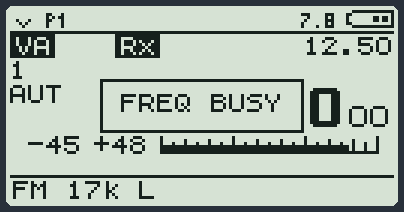
| The channel is busy | FREQ BUSY | BusyCL in the TX menu. Wait for the other person to finish. |
| The memory channel has the transmit lock | The power letter is missing at the bottom. | The lock (TxLock) is set and removed from the PC program, one memory channel at a time. |
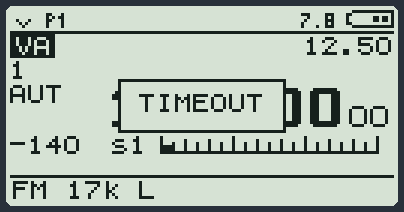
| You talked for too long | TIMEOUT | Tx TOT in the TX menu. Let go of PTT and press it again. |
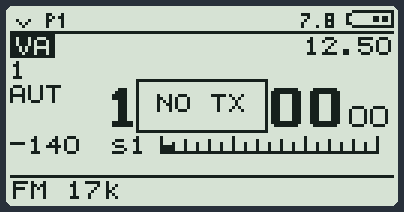
| You are in the aircraft band | NO TX | You cannot transmit there. |
| You are on the FM radio (WFM) or in AM, AMB, DSB, BYP | NO TX | You can transmit only in FM and in CW. |
| The upconverter is on for that VFO | NO TX | F and then 8 to turn it off. |
The FM radio with music
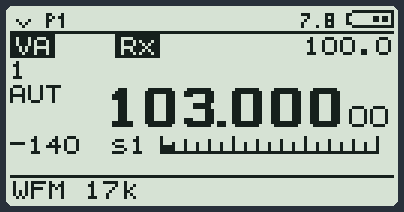
F and then 0: the VFO becomes a little FM radio (from 76 to 108 MHz). The arrows change station, a long * goes round the whole band: every station it finds goes into the SCList list, and at the end the radio goes back where you were and opens the list for you. F and then 0 again and the VFO goes back as it was, even if you had switched the radio off with the FM radio on. The next time, F and then 0 starts from the last station, even after a power off. You cannot transmit on the FM radio.
Finding the sub-tone of a repeater
While you listen to someone in FM on a VFO that has no sub-tone set, the radio tries to recognise it and writes it at the top (for example 88.5 or D023N). If you press F and then hold down 4, it saves it on the VFO: you read TONE SAVED. If there is nothing to save you read NO TONE.