Repeaters and sub-tones
How to set up a repeater, from start to finish
What a repeater is
Two small radios far apart, with a mountain in between, cannot hear each other. A repeater is a radio placed up high: it listens on one frequency and, at the same moment, repeats what it hears on another. This way you and your friend hear each other even from far away.
To use a repeater the radio must know three things. You find them in the lists of repeaters for your area.
| What | Menu item | It means |
|---|---|---|
| The frequency | (you type it with the numbers) | Where you listen to the repeater. |
| The shift | Shift and Offset | Where you transmit: higher (+) or lower (-) than where you listen, and by how much. |
| The sub-tone | TxCTCS or Tx DCS | A hidden tone the radio sends together with the voice. Many repeaters open only if they hear it. |
Setting up a repeater, step by step
Let us take an example: a repeater you listen to on 145.600, with shift minus, offset 0.600 MHz and sub-tone 88.5 Hz. The numbers of your repeater will be different: the steps are the same.
- Type the frequency where you listen to the repeater: 1 4 5 6 0 0. See Typing a frequency.
- Press MENU and then 1: you are in the VFO group. Go to the item Shift, press MENU, choose - with the arrows and press MENU to save.
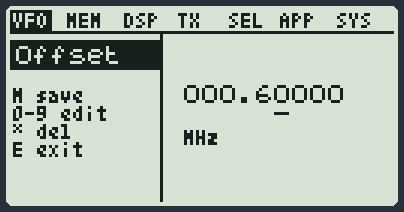
- Go down one item: Offset. Press MENU, type 000.60000 with the number keys (* deletes) and press MENU to save.
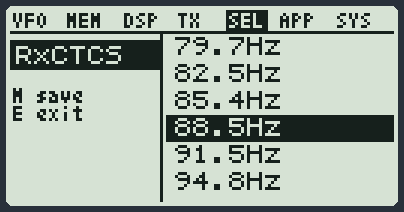
- Press 5: you are in the SEL group. Go to the item TxCTCS, press MENU, choose 88.5Hz with the arrows and press MENU to save.
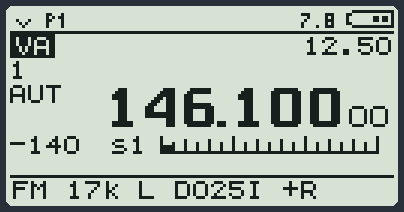
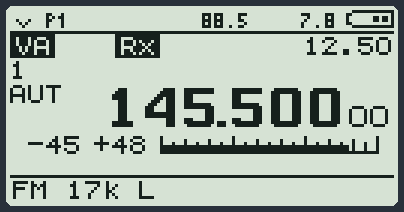
- Press EXIT to leave the menu. In the bottom line you now read the sub-tone and the sign of the shift.
- Press the PTT and say your callsign. When you let it go, you hear the repeater's "tail": it means it heard you.
- If it works, save it in a memory channel with F and then 4: next time you recall it without doing anything again. See Save, rename, delete.
The sub-tones: CTCSS and DCS
The sub-tone is a very low sound, which you cannot hear, sent together with the voice. It works like a key: the repeater opens only for those who have the right one. There are two kinds: CTCSS (a tone, for example 88.5 Hz) and DCS (a number code, for example D023). The repeater uses only one of the two.
| Item | What it does | Advice |
|---|---|---|
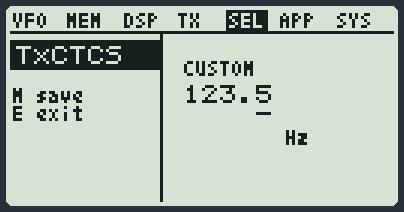
| TxCTCS, Tx DCS | The tone or the code that you send when you transmit. | It is the one that opens the repeater: set it. |
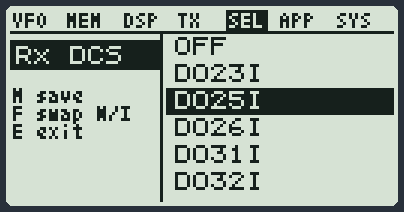
| RxCTCS, Rx DCS | The loudspeaker opens only if the person transmitting sends that tone or that code. | Leave it on OFF if you are not sure: otherwise you may hear nothing. |
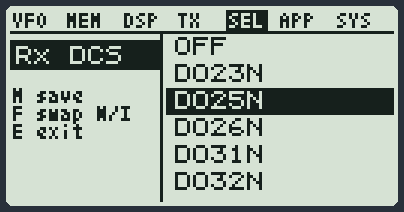
In the DCS codes the F key flips the code from normal (N) to inverted (I). In the CTCSS tones, at the bottom of the list there is CUSTOM: it lets you type a tone that is not in the list.
You do not know the sub-tone? The radio finds it
Listen to someone who is talking on the repeater, on a VFO with no sub-tone set. The radio tries to recognise the tone and writes it at the top. With F and then 4 held down it saves it on the VFO. See Finding the sub-tone of a repeater.
The reverse: listening to the repeater's input
Hold down 8: the radio listens on the frequency where you usually transmit, that is the one where the others come into the repeater. R appears at the bottom. Hold down 8 again to go back to normal.
It is for finding out if you hear the other person directly, without the repeater. If you hear them well, you can both move to a free frequency and leave the repeater to the others.
The 1750 Hz tone
Some old repeaters do not want the sub-tone: they open with a very short whistle, at 1750 Hz. While you transmit by voice, hold down side key 2 for one second: the radio sends the tone. It works only if the tone has been turned on from the PC program.
Rx STE and Tx STE: removing the burst of noise at the end
When a transmission ends, you often hear a burst of hiss. Two items remove it.
| Item | What it does |
|---|---|
| Rx STE | After you let go of PTT, it keeps the loudspeaker silent for the time you choose: this way you do not hear the repeater closing. |
| Tx STE | At the end of your transmission it sends a small signal, so the radio of the person listening to you closes the audio without the burst of noise. |
If the repeater does not open
| What happens | What to check |
|---|---|
| You press PTT and the repeater does not answer | The sub-tone for transmitting (TxCTCS or Tx DCS): it is missing, or it is not the right one. |
| You transmit but nobody hears you | Shift on the wrong side, or Offset at zero or with the wrong value. |
| You hear the repeater but cannot open it | You are too far away or the power is low: hold down 6 to raise it. |
| On the screen you read FREQ BUSY | BusyCL is on and someone is talking on the channel. Wait until they finish. |
| On the screen you read NO TX | The radio does not transmit on that frequency. See Transmitting. |
| The repeater opens but you hear nothing | RxCTCS or Rx DCS are on with a wrong value: set them to OFF. |