The menu
All the items, group by group
How to use the menu
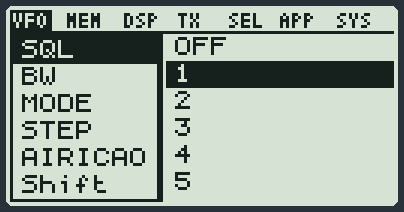
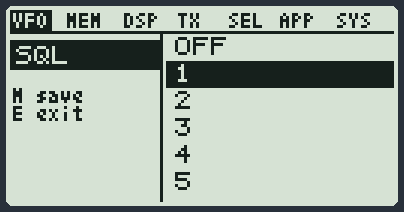
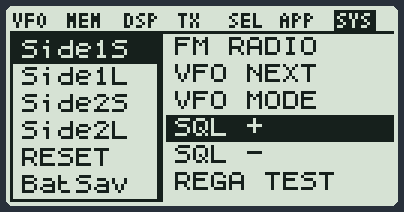
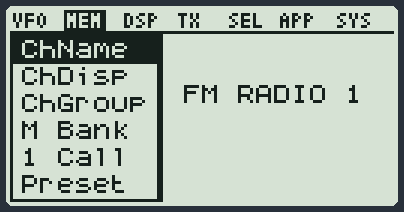
- Press MENU. At the top you see the seven groups: VFO MEM DSP TX SEL APP SYS. The inverted one is the group you are in.
- Change group with the keys from 1 to 7, or with F, which goes to the next group.
- Move through the items with UP and DOWN. On the right you already see the current value.
- Press MENU to open the item. Change the value with the arrows.
- Press MENU to save, or EXIT to leave it as it was.
- EXIT from the list closes the menu.
| Key | In the menu |
|---|---|
| 1 ... 7 | jump to the groups: 1 VFO, 2 MEM, 3 DSP, 4 TX, 5 SEL, 6 APP, 7 SYS |
| F | in the list it goes to the next group; inside some items it does the function written in small print on the left |
| MENU | enters the item; if you are already changing it, confirms and saves |
| EXIT | goes back without saving; from the list it closes the menu |
| UP | previous item, or previous value |
| DOWN | next item, or next value |
VFO: how the radio listens
These items apply to the VFO you are using at that moment (the one with the inverted label).
| Item | Values | Factory | What it is for |
|---|---|---|---|
| SQL | OFF, from 1 to 9, NO RX | 1 | The squelch: the gate that keeps the loudspeaker silent when nobody is talking. With OFF you always hear the hiss. The higher the number, the stronger the signal must be to open the audio. NO RX keeps it always closed. In WFM and CW the audio always stays open; in DSB and AMB the squelch works only with the DSBSql item set to ON. |
| BW | W 26 kHz, W 23 kHz, W 20 kHz, W 17 kHz, W 14 kHz, W.12 kHz, N 10 kHz, N.9 kHz, U 7 kHz, U 6 kHz | W 17 kHz | How wide the "window" is that the radio listens through. Wide (W) for normal voice in FM, narrow (N, U) for narrow signals such as Morse. |
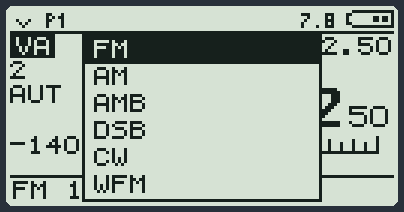
| MODE | FM, AM, AMB, DSB, CW, WFM, BYP | FM | The type of reception. FM for repeaters and normal radios, AM for the aircraft band, AMB for shortwave broadcast stations, DSB (Dual Side Band) for double sideband, CW for Morse, WFM for the FM radio with music (only from 76 to 108 MHz), BYP for raw audio. You can transmit only in FM and in CW. |
| STEP | 10 Hz, 50 Hz, 100 Hz, 500 Hz, 1 kHz, 2.5 kHz, 5 kHz, 6.25 kHz, 8.33 kHz, 9 kHz, 10 kHz, 12.5 kHz, 20 kHz, 25 kHz, 50 kHz, 100 kHz | 12.5 kHz | How far the frequency moves with each press of an arrow. |
| AIRICAO | OFF, ON | OFF | For the aircraft band: with ON the arrows jump to the right 8.33 kHz channels. An I appears at the top. |
| Shift | OFF, +, - | OFF | It is for repeaters: it says whether the radio must transmit higher (+) or lower (-) than where it listens. How much is set by Offset. |
| Offset | a number in MHz, typed with the digits | - | The distance between the listening frequency and the transmitting frequency when Shift is on. You type it with the number keys; * deletes. |
| NoiseB | OFF, ON | OFF | Removes pulse noise (motors, sparks). An N appears at the top. |
| Rx AGC | AUTO, MAN, FAST, NORM, SLOW | AUTO | Who sets the volume of the incoming signals. With AUTO the radio does everything. With MAN you set it yourself with RFGain. FAST, NORM and SLOW change how quickly it reacts. |
| RFGain | 32 steps, in dB | - | How much the radio "pricks up its ear". It applies when Rx AGC is on MAN. It opens quickly with 4 held down. |
| Rx STE | OFF, from 100 ms to 2000 ms | OFF | It is for repeaters. When you let go of PTT after talking, the loudspeaker stays silent for the time you choose here, so you do not hear the "puff" of the repeater closing. Then the audio comes back by itself. It applies only after voice, not after Morse. |
| Scramb | OFF, from 950 Hz to 3950 Hz | OFF | The scrambler: it makes the voice impossible to understand for anyone who does not have the same code. Here you choose only the code, one for the whole radio; both radios must have the same value. The scrambler is not switched on from the menu: you switch it on and off on the VFO you need with F and then a long 8, or with a side key you have given SCRAMBLR. This way the other VFOs stay in clear. It works only in FM: when it is on, the $ symbol appears at the bottom next to FM. |
| Compnd | OFF, TX, RX, RX/TX | OFF | The compander: it squeezes the voice when transmitting and widens it again when receiving, so you hear less hiss. The other radio must have it too. |
| EQ | FLAT, VOICE, BRIGHT, BASS, SOFT | FLAT | The sound equaliser: FLAT leaves everything as it is, VOICE brings out the voice, BRIGHT more treble, BASS more bass, SOFT softer. |
| SetAFC | OFF, from 1 to 8 | 2 | It corrects by itself the small frequency errors of someone who transmits a little off. |
| DSBSql | OFF, ON | OFF | The squelch in DSB and AMB too. With OFF (factory setting) the audio always stays open in these two modes. With ON the squelch works as in FM and AM: with no signal the loudspeaker is silent, and the green LED and the light follow the signal. In WFM and CW nothing changes. |
MEM: the memory channels
Names, groups and banks of the memory channels, and the list of presets.
| Item | Values | Factory | What it is for |
|---|---|---|---|
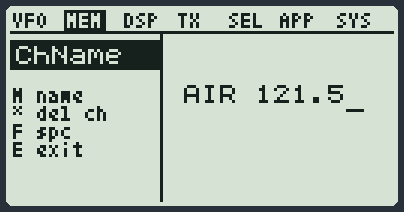
| ChName | choose the channel, then type the name | - | Gives a name to a memory channel. With the arrows you choose the channel, MENU opens the typing, * alone deletes the channel (it asks you to confirm). |
| ChDisp | FREQ, CHANNEL, NAME, NM-S/FR-L, NM-L/FR-S | NM-S/FR-L | What you see when you are on a memory channel: only the frequency, the channel number, the name, or name and frequency together (one small and the other big). |
| ChGroup | the groups from 0 to 15 | - | Memory channels can be split into groups (for example "repeaters", "aircraft"). Here you choose which groups you want to see: the other channels disappear from the list. F ticks and unticks a group. |
| M Bank | the banks from 0 to 15 | - | A bank is a whole notebook of 500 memory channels. Here you choose which notebook to use. 0 lets you type the name of the bank. |
| 1 Call | a channel | - | Your favourite channel. You recall it in a moment from anywhere with F and then 9 held down. |
| Preset | opens the list of presets | - | Opens the list of presets: ready-made bands with frequency, mode and scan limits. See the page Memory channels, presets and scan. You need the Preset module. |
DSP: screen and VFOs
How many frequencies to see, the light, the switch-on message.
| Item | Values | Factory | What it is for |
|---|---|---|---|
| SetVFO | 1 VFO, 2 VFO, 3 VFO, DW LOCK, DW LINK, SPLIT, TW LOCK, TW LINK | 1 VFO | How many frequencies you want to see and listen to together. 1 VFO, 2 VFO, 3 VFO show one, two or three lines. DW (two) and TW (three) watch them all: LOCK stays on the VFO you chose, LINK jumps by itself to the one that is receiving. SPLIT listens on one VFO and transmits on the other. |
| SCList | opens the list | - | Opens the list of the frequencies you marked with * or that the scan found. |
| BLTime | OFF, 5 sec, 10 sec, 20 sec, 1 min, 3 min, RX/TX, ON | ON | How long the screen light stays on after the last key. When the time is up the light goes down slowly, in half a second, to the low light (LOW in BLCtrl): if LOW is at 0 it goes off completely. When it comes back on it is full straight away. OFF keeps it always at the low light, ON always on, RX/TX turns it on only when you receive or transmit. |
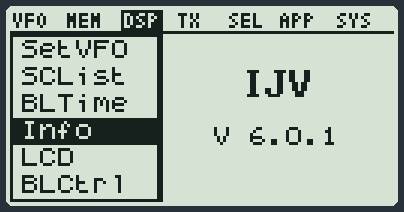
| Info | shows the version | - | Shows which firmware is in the radio, for example V 6.0.1. |
| LCD | NORMAL, INVERTED | NORMAL | Normal screen, or reversed (light text on a dark background). |
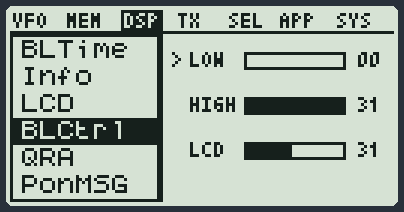
| BLCtrl | three bars | - | Three bars. LOW = the low light, the one that stays when the screen "goes off": at 0 (as it leaves the factory) the light goes off completely, with a higher number it stays on dimly. HIGH = the light on. LCD = how dark the drawing is (contrast). LOW never goes higher than HIGH. 1, 2 and 3 choose LOW, HIGH and LCD, F goes to the next bar, the arrows adjust, MENU saves, EXIT leaves everything as it was. On the LOW bar you see the low light at once, but only from 1 up: at 0 the screen stays lit, otherwise you could not read anything. The low light uses a little more battery than the light off. |
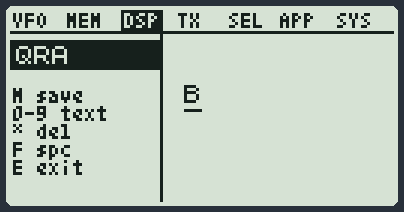
| QRA | a text | - | Your callsign. It is used by the beacon, the messages and the welcome at switch-on. You type it as on old phones: press the same key several times to change letter. |
| PonMSG | NONE, LOGO, MESSAGE | LOGO | What you see when you switch the radio on: nothing, the logo, or a message of yours. F lets you type the message. |
| StbyLED | ON, OFF | ON | The little green light that flashes now and then while the radio is waiting. OFF switches it off. |
TX: transmitting
Power, microphone and the safeties that stop you transmitting by mistake.
| Item | Values | Factory | What it is for |
|---|---|---|---|
| Tx PWR | LOW, MID, HIGH | LOW | The power you transmit with. Low uses less battery. You change it quickly with 6 held down. |
| Tx TOT | OFF, 30 Sec, 1 min, 3 min, 5 min | OFF | The longest time for one transmission. If you go over it the radio stops by itself and writes TIMEOUT. It keeps you from staying in transmission by mistake. |
| Mic dB | +2.0dB, +5.0dB, +9.0dB, +13.0dB, +17.0dB, +21.0dB, +25.0dB, +28.1dB, +31.1dB | +17.0dB | How sensitive the microphone is. Raise it if people hear you quietly, lower it if they hear you croaking. |
| SetDEV | NFM-, NFM, HAM, HAM+, FM, FM+, AFSK, AUDIO, WIDE, WFM | HAM+ | How "wide" your voice goes out. Leave the factory value if you do not know what you are doing: NFM and HAM are for normal use. |
| BusyCL | OFF, ON | OFF | With ON the radio does not let you transmit if someone is already talking on the channel. If you try, it writes FREQ BUSY. |
| Tx STE | OFF, ON | ON | Sends a small signal at the end of the transmission, so the other radio closes the audio without the final "puff". With ON, if you do not use a sub-tone in receive, the radio also recognises that signal when others send it and closes the audio at once; but if the transmission goes on, the audio comes back by itself after about three tenths of a second. With OFF the radio does not send it, and when it listens it does not even look for it. |
| VOX | OFF, from 1 to 10 | OFF | It transmits by itself when you talk, without pressing PTT. The number says how loud you must talk. Vx appears at the top. |
| PToggl | OFF, ON | OFF | PTT becomes a switch: you press it once to talk and once more to stop. PT appears at the top. |
| Txp EN | OFF, ON | ON | The main switch for transmitting. With OFF the radio only listens and PTT does nothing. You can also change it with F and then 6. |
SEL: tones and codes
The sub-tones for repeaters, what the radio sends with PTT and, at the bottom, the call items.
| Item | Values | Factory | What it is for |
|---|---|---|---|
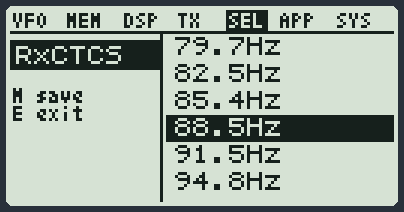
| RxCTCS | OFF, the tones from 67.0 to 254.1 Hz, CUSTOM | - | The sub-tone for receiving: the loudspeaker opens only if the person transmitting sends this hidden tone. It is for not hearing the others on the same channel. |
| TxCTCS | OFF, the tones from 67.0 to 254.1 Hz, CUSTOM | - | The sub-tone you send when you transmit. Many repeaters open only if they receive it. |
| Rx DCS | OFF, the codes from D023 to D754 | - | Like the sub-tone, but with a number code. F flips it from normal (N) to inverted (I). |
| Tx DCS | OFF, the codes from D023 to D754 | - | The code you send when you transmit. F flips it from normal to inverted. |
| LocMon | OFF, ON | OFF | With ON you hear in the loudspeaker the tones the radio transmits: Morse, beacon, roger, calls. Not the voice. |
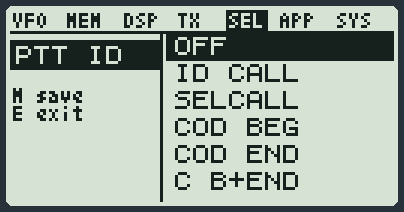
| PTT ID | OFF, ID CALL, SELCALL, COD BEG, COD END, C B+END, R Single, R 2Tone, Apollo, R MDC | OFF | What the radio sends when you press or let go of PTT. R Single, R 2Tone and Apollo are the end-of-transmission "beeps" (roger). ID CALL, SELCALL, COD BEG, COD END and C B+END send the call codes and work only with the Calls module. With SELCALL, after a call you talk without calling again for the D Hold time. |
| D Live | OFF, Raw, Pop | OFF | Shows the call codes that arrive. Raw writes them in a row at the top, Pop shows them in a box. It works with the Calls module. |
| D Code | OFF, DTMF, ZVEI1, ZVEI2, CCIR1, CCIR1-F, ZVEI3, CCIR20, EEA, MDC1200 | OFF | The type of code used for calls on this VFO: DTMF (the telephone tones), the five tones (ZVEI, CCIR, EEA) or MDC1200. It works with the Calls module. |
| D Rsp | OFF, Ring, Reply, Both | OFF | What the radio does when someone calls your code: Ring rings, Reply answers by itself, Both does both things, OFF nothing. It works with the Calls module. |
| D Hold | from 5 to 60 seconds | 5 | How many seconds the received code stays on screen. With PTT ID on SELCALL it is also the time of the conversation: after a call, made or received, the audio stays open and pressing PTT you just talk, without sending the call again. The time starts again at every over. If nobody talks for all this time, the conversation ends: PTT goes back to calling and the audio waits for the call again. It works with the Calls module. |
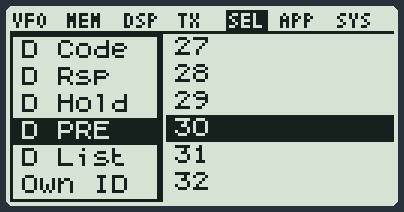
| D PRE | from 3 to 99 (each step is 10 milliseconds) | 3 | The time the radio waits, after it starts transmitting, before sending the tones. It works with the Calls module. |
| D List | opens the contact list | - | Opens the call contact list: choose a person and the radio is ready to call them. You need the Calls module. The contact list is filled from the PC program. |
| Own ID | opens the typing | - | Your call number, the one others call you on. You need the Setup module to type it. |
| UPCode | opens the typing | - | The code sent when you press PTT (usually the number of the person you want to call). You need the Setup module. |
| DWCode | opens the typing | - | The code sent when you let go of PTT. You need the Setup module. |
APP: the modules
There are no settings here: there is the list of the modules you loaded in the radio, in alphabetical order. If you have loaded none, the list is empty.
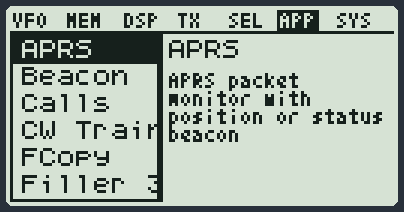
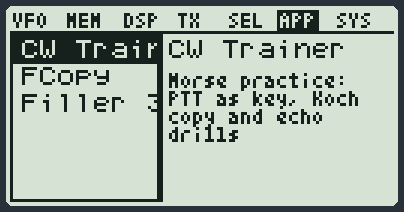
Press MENU on a module to open it. How to use them is explained on the page The modules.
SYS: the radio in general
Side keys, battery, locks, and at the bottom the module settings (Morse, messages, APRS).
| Item | Values | Factory | What it is for |
|---|---|---|---|
| Side1S | NONE, FLASHLGHT, TX POWER, MONITOR, SCANNER, FM RADIO, VFO NEXT, VFO MODE, SQL +, SQL -, REGA TEST, REGA ALRM, PRESET, AGC MAN, CH LIST, PHONEBOOK, CW CALLCQ, VOX, FASTSCAN, FCOPY, SCRAMBLR, UPCONV, COMPAND, NOISE BLK, TX ENABLE, VFO/MEM, MEM>VFO, MEM SAVE, MEM DEL, MEM GROUP, 1 CALL, FREQ REV, DW/TW, HF BAND, FAST MEM, RSSI TRK, SMS MENU, SMS LIST, SMS LIST, SMS WRITE, REPLY REQ, SMS KRX, SMS KTX, SMS CW, STEP +, STEP -, MENU, RNG MIN, RNG MAX, BANK | SQL + | What side key 1 does with a short press. The list of actions is explained on the keys page. |
| Side1L | NONE, FLASHLGHT, TX POWER, MONITOR, SCANNER, FM RADIO, VFO NEXT, VFO MODE, SQL +, SQL -, REGA TEST, REGA ALRM, PRESET, AGC MAN, CH LIST, PHONEBOOK, CW CALLCQ, VOX, FASTSCAN, FCOPY, SCRAMBLR, UPCONV, COMPAND, NOISE BLK, TX ENABLE, VFO/MEM, MEM>VFO, MEM SAVE, MEM DEL, MEM GROUP, 1 CALL, FREQ REV, DW/TW, HF BAND, FAST MEM, RSSI TRK, SMS MENU, SMS LIST, SMS LIST, SMS WRITE, REPLY REQ, SMS KRX, SMS KTX, SMS CW, STEP +, STEP -, MENU, RNG MIN, RNG MAX, BANK | MONITOR | What side key 1 does when held down. |
| Side2S | NONE, FLASHLGHT, TX POWER, MONITOR, SCANNER, FM RADIO, VFO NEXT, VFO MODE, SQL +, SQL -, REGA TEST, REGA ALRM, PRESET, AGC MAN, CH LIST, PHONEBOOK, CW CALLCQ, VOX, FASTSCAN, FCOPY, SCRAMBLR, UPCONV, COMPAND, NOISE BLK, TX ENABLE, VFO/MEM, MEM>VFO, MEM SAVE, MEM DEL, MEM GROUP, 1 CALL, FREQ REV, DW/TW, HF BAND, FAST MEM, RSSI TRK, SMS MENU, SMS LIST, SMS LIST, SMS WRITE, REPLY REQ, SMS KRX, SMS KTX, SMS CW, STEP +, STEP -, MENU, RNG MIN, RNG MAX, BANK | SQL - | What side key 2 does with a short press. |
| Side2L | NONE, FLASHLGHT, TX POWER, MONITOR, SCANNER, FM RADIO, VFO NEXT, VFO MODE, SQL +, SQL -, REGA TEST, REGA ALRM, PRESET, AGC MAN, CH LIST, PHONEBOOK, CW CALLCQ, VOX, FASTSCAN, FCOPY, SCRAMBLR, UPCONV, COMPAND, NOISE BLK, TX ENABLE, VFO/MEM, MEM>VFO, MEM SAVE, MEM DEL, MEM GROUP, 1 CALL, FREQ REV, DW/TW, HF BAND, FAST MEM, RSSI TRK, SMS MENU, SMS LIST, SMS LIST, SMS WRITE, REPLY REQ, SMS KRX, SMS KTX, SMS CW, STEP +, STEP -, MENU, RNG MIN, RNG MAX, BANK | PRESET | What side key 2 does when held down. |
| RESET | VFO, ALL | VFO | Puts things back as from the factory. VFO resets only the three VFOs: they go back to FM on 145.000, 433.000 and 145.000 MHz; memory channels and settings stay. ALL brings all the settings and the calibration back to the factory ones and erases all the memory channels, then the radio restarts by itself. See If something goes wrong. |
| BatSav | OFF, LOW, MID, MAX | OFF | Battery saving: when nothing is happening the radio takes little naps and wakes up now and then to listen. The higher it is, the more it sleeps. PS appears at the top. |
| UpConv | OFF, 50, 125, CUSTOM | OFF | For those who have an external converter for shortwave: the radio shows the real frequency instead of the shifted one. CUSTOM uses the shift written in TransV. With this function on, the VFO does not transmit. |
| TransV | a number in MHz, typed with the digits | - | The shift to use when UpConv is on CUSTOM. |
| Sc REV | three bars | - | The scan times, on three rows as in BLCtrl. T IN = how long it stays on a signal, T OUT = how long it waits after the signal has ended, SPEED = how fast it runs. 1, 2 and 3 choose the row, F goes to the next row, the arrows adjust. |
| AutoSv | OFF, ON | ON | It only works when you are on a memory. With ON, what you change (squelch, power, tone...) is written to the channel right away. On a frequency and on the FM radio it does nothing. |
| KeyLok | OFF, AUTO | OFF | With AUTO the keys lock by themselves after 15 seconds without touching anything. To lock and unlock them by hand, hold down F. |
| LckVFO | OFF, ON | OFF | Locks the frequency: you can no longer change it by mistake with the arrows or the numbers. |
| PonBep | OFF, ON | OFF | A beep when you switch the radio on. |
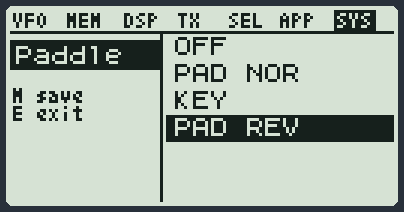
| Paddle | OFF, PAD NOR, KEY, PAD REV | OFF | For Morse: it says what you have connected to the USB-C socket. PAD NOR = a paddle with two levers, PAD REV = the same with the levers swapped, KEY = a straight key, OFF = nothing. See the Morse page. |
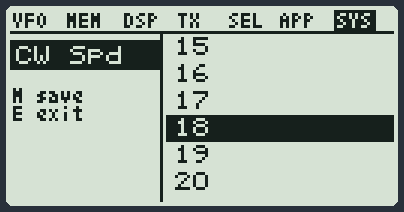
| CW Spd | from 5 to 30 | 15 | The Morse speed, in words per minute. It applies to the paddle, the beacon, the Morse messages and the gym. |
| SMS Key | opens the typing | - | The secret word for private messages: the person receiving them must have the same one. You need the SMS module. |
| APRSPos | opens the typing | - | Where you are, to let others know with APRS. You type it like 4527.85N/00934.60E. You need the Setup module. |
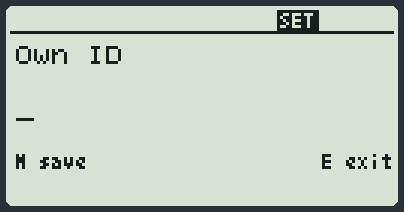
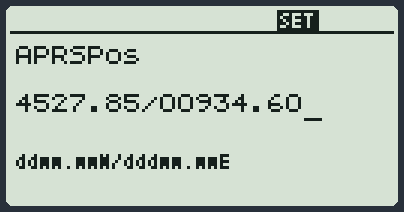
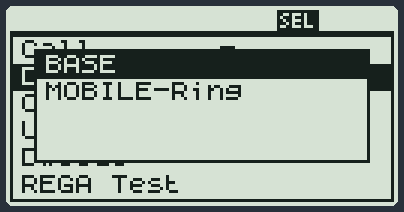
Own ID, UPCode, DWCode, APRSPos: the Setup module
These four items are texts to type. To type them the radio uses a small module called Setup: it loads by itself when you choose the item, and it does not appear in the list of modules. It must be among those you ticked in RadioManager, otherwise you read N/A.
- Press MENU and go to the item: Own ID, UPCode and DWCode are in the SEL group, APRSPos is in the SYS group.
- Press MENU: the typing of that text opens at once.
- Write with the number keys, up to 10 characters. For the letters: press 2 several times for A, B, C and 3 for D, or F and then 1, 2, 3, 4 for A, B, C, D. * and # exist only with the DTMF codes (key 1 pressed several times, or F for the #). With the five tones (ZVEI, CCIR, EEA) you cannot write them.
- Press MENU to save, EXIT to leave it as it was.
- Now you see the four items with their values. You can choose another one with the arrows and MENU, or leave with EXIT.
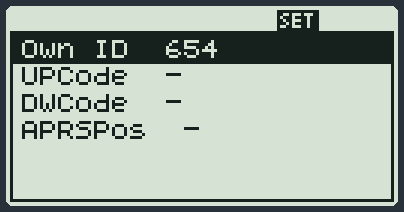
| Item | What to type |
|---|---|
| Own ID | Your call number. It is used by the calls and the messages. |
| UPCode | The code sent when you press PTT (usually the number of the person you call). |
| DWCode | The code sent when you let go of PTT. |
| APRSPos | Where you are: 18 characters, like 4527.85N/00934.60E (degrees and minutes of latitude, then of longitude). If you do not type the letters, N and E are used. If you delete everything, the position is removed. |
| Message | It means |
|---|---|
| POS OK | Position saved. |
| POS ERR | The position is not written the right way. You stay in the typing: correct it. |
| SET next to APRSPos | The position is there (it is too long to fit in the line). |
| - | The item is empty. |
Typing a text
For names and texts the radio uses the number keys like old phones. Press the same key several times to change letter: 2 gives A, then B, then C, then 2. Wait a moment and the cursor moves on by itself.
| Key | What it does |
|---|---|
| 0 ... 9 | The letters and the digits. |
| * | Deletes. |
| F | A space. |
| UP DOWN | Move the cursor. |
| MENU | Saves. |
| EXIT | Leaves without saving. |