The modules
The extra functions: how to choose them, how to open them, where they are explained
What modules are
The modules are the extra functions of the radio: messages, Morse, decoders, calls. You choose which ones to load. There is room: if you want you can even put them all in, in just one firmware (see why they all fit).
This manual does not explain the modules one by one: each one already has its data sheet, with pictures and steps. Here you find how to choose them, how to open them, and the list with links to the data sheets.
How to choose them
- In RadioManager, Firmware 6 page, tick the modules you want. Next to each one there is the link to its data sheet.
- Look at the space bar: if it is full, remove something.
- The first time press FLASH V6. After that, with the radio on, MODULES ONLY is enough.
All the steps are on the page What it is and how to install it.
How to open a module
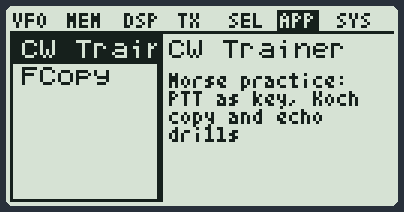
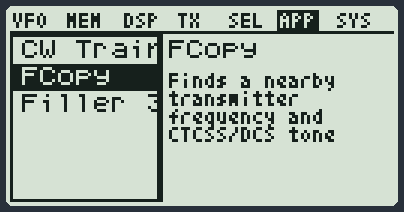
- Press MENU and then 6: you are in the APP group. You see the list of the modules you loaded, in alphabetical order.
- Choose with the arrows. On the right you read what it is for.
- Press MENU: the module opens.
- EXIT closes it and you go back to the main screen.
The keys that quick-open a module
From the main screen, without going through the menu:
| Keys | Opens |
|---|---|
| F and then * | FastScan. If you have 2 or 3 VFOs on screen it opens FS Multiband. |
| F and then 6 long | FastScan, as above. |
| 7 long, or F and then 7 | Parrot. |
| F and then 0 long | SMS. |
| F and then side key 1 | The list of Preset. |
| F and then 1 | The list of bands (Preset module). |
| F and then MENU | Calls, ready to write the code to call. |
| F and then a long MENU | The call contact list (Calls module). |
The menu items that open a module
| Item | Group | Opens |
|---|---|---|
| Preset | MEM | The list of presets (Preset module). |
| D List | SEL | The call contact list (Calls module). |
| Own ID, UPCode, DWCode | SEL | The typing of that text (Setup module). |
| APRSPos | SYS | Writing the position (Setup module). |
| SMS Key | SYS | The typing of the message key (SMS module). |
The modules that work in the background
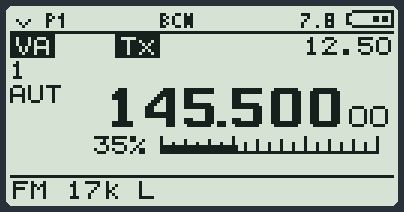
Some modules keep working even when you go back to the main screen: the beacon, the calls, the messages. A small code in the top line tells you. If they were on when you switched the radio off, they start again by themselves.
The messages when you open a module
| Message | It means | What to do |
|---|---|---|
| N/A | The module is not in the radio. | Load it with RadioManager. |
| BUSY | The radio is transmitting or is busy. | Try again in a moment. |
| NO SPACE | There is no room to keep it ready: the open ones are all working in the background. | Turn off one of the modules that work in the background. |
| BAD APP | The module is not right for this base. | Do FLASH V6 again with RadioManager. |
| WRITE ERROR | The radio could not prepare it. | Try again. If it keeps happening, load the modules again. |
All the modules and their data sheets
The data sheets are the ones you already know: the functions of the modules are the same. The modules that have no data sheet are explained in this manual.
| Module | What it is for | Where the explanation is |
|---|---|---|
| AF Tap | It calibrates the audio tap by itself: it opens the first time after installation. | Data sheet → |
| AirACARS | Reads aircraft ACARS messages on the airband: registration, flight and text. In the menu it is called AirACARS. | Data sheet → |
| AirCopy | Copies the memory channels from one radio to another, over the air. | Data sheet → |
| AIS | Shows the ships around you from their AIS messages: name, position, speed, course and destination. | Data sheet → |
| APRS | Reads APRS packets, sends your position and can repeat them as a digipeater. | Data sheet → |
| BASIC | Runs small BASIC programs that control the radio. | Data sheet → |
| Beacon | Transmits by itself, now and then, your callsign in Morse. | Data sheet → |
| Cable Copy | Copies the memory channels from one radio to another, with the cable. | Data sheet → |
| Calls | Selective calls: DTMF, five tones, Selcall, MDC1200. | Data sheet → |
| Clarifier | It shifts only the receive (RIT) or only the transmit (XIT): the clarifier for CW and SSB. | Data sheet → |
| CW Decode | Reads the incoming Morse and writes it on the screen. | Data sheet → |
| CW Paddle | The key or the paddle on the USB-C socket keys the Morse transmission. (it is not in the radio's list: it opens from a menu item or by itself) | Data sheet → |
| CW Trainer | The gym for learning Morse. | Data sheet → |
| DLINK BBS | A modem for data, with the terminal for the BBS. | Data sheet → |
| DSC ATIS | Reads the digital calls of ships on channel 70 (distress calls with position and time) and ATIS, which tells which ship has just spoken. | Data sheet → |
| FastScan | Looks quickly at a piece of band and draws where there are signals. | Data sheet → |
| FCopy | Finds the frequency and the sub-tone of a nearby radio. | Data sheet → |
| FS Multiband | FastScan on several bands at once, one per VFO. | Data sheet → |
| NAVTEX | Reads the NAVTEX bulletins for ships. | Data sheet → |
| Parrot | Records what you receive and lets you hear it again. | Data sheet → |
| Pocket BBS | A mailbox that works by itself: messages and bulletins. | Data sheet → |
| Preset | The list of presets and the list of bands. (it is not in the radio's list: it opens from a menu item or by itself) | In this manual: Memory channels, presets and scan |
| RDS | On the FM radio, on the VFO, it shows the station name (RDS) in place of Rx, with one or two VFOs on screen (with three there is no room). | Data sheet → |
| Repeater | Listens, records and transmits again: a small repeater. | Data sheet → |
| RS41 | Reads RS41 weather balloons. It works on a stock radio too, better with the audio pick-up modification (tap). | Data sheet → |
| RTTY | Reads teleprinters (RTTY) and can transmit them. | Data sheet → |
| Scan | The scan: it looks for who is talking on the frequencies or on the memory channels. (it is not in the radio's list: it opens from a menu item or by itself) | In this manual: Memory channels, presets and scan |
| Setup | It is for typing Own ID, UPCode, DWCode and the APRS position. (it is not in the radio's list: it opens from a menu item or by itself) | In this manual: The menu |
| Sig Report | Answers callers by itself, telling them how strongly it received them. | Data sheet → |
| SMS | Text messages between radios. | Data sheet → |
| SSTV | Receives colour SSTV pictures from the Space Station and from radio amateurs, and can also transmit them (an amateur radio licence is needed). | Data sheet → |
| Test Set | Measuring tools: analyser, generator, measurements, Remote S-meter. | Data sheet → |
| Tone Scan | It recognises the sub-tone of the person you are listening to in FM and writes it at the top. (it is not in the radio's list: it opens from a menu item or by itself) | Data sheet → |
| USB | The link with the computer from the USB-C socket. | In this manual: If something goes wrong |
| VFO | The main screen: frequencies, memory channels, keys, transmission. (it is not in the radio's list: it opens from a menu item or by itself) | In this manual: The screen and the keys |