Receiving well
Squelch, mode, bandwidth, gain, and shortwave
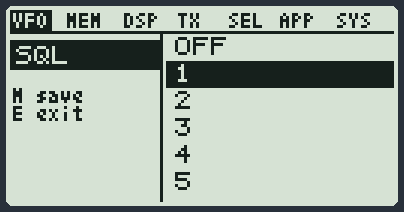
The squelch: silencing the hiss
When nobody is talking, a radio makes a steady hiss. The squelch is a gate: it keeps the loudspeaker silent and opens it only when a strong enough signal comes in.
| What you want | What you do |
|---|---|
| Raise or lower the squelch quickly | Side key 1 short raises it, side key 2 short lowers it. You also find it in the menu: MENU, 1, item SQL. |
| Hear a weak signal that does not open it | Lower the squelch, or hold down side key 1: this is the monitor, it opens the audio even with no signal. Press it again to close. |
| Never hear anything on a VFO | Set SQL to NO RX: that VFO always stays silent. |
| Have the squelch in DSB or AMB too | Set the DSBSql item to ON: MENU, 1, item DSBSql. From the factory it is OFF and in these two modes the audio always stays open. |
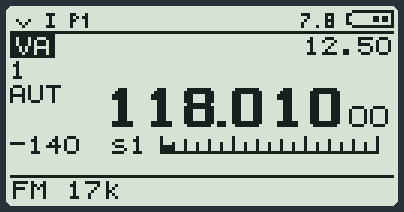
Under the frequency you see how strong the signal is: a number (for example -140), the code s1 ... s9 and a bar. The longer the bar, the stronger the signal.
The mode: what kind of signal you listen to
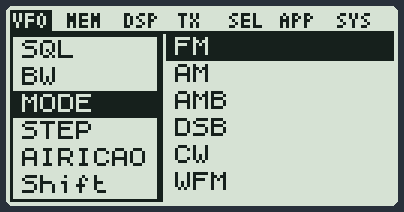
Each kind of transmission needs its own mode. If you choose the wrong one you hear a croaking sound, or nothing at all. You change it quickly by holding down 0, or from the menu with the item MODE.
| Mode | When you use it |
|---|---|
| FM | Almost always: repeaters, radio amateurs on VHF and UHF, PMR, work radios. It is the factory one. |
| AM | Amplitude transmissions. For the aircraft band it is the only right mode. It is also good for CB. |
| AMB | It is AM optimised for shortwave broadcast stations. Do not use it for aircraft. |
| DSB | Dual Side Band, double sideband. It goes with a small step, to tune precisely. |
| CW | Morse. In this mode the PTT works as the Morse key. |
| WFM | The FM radio with music, only from 76 to 108 MHz. See The FM radio with music. |
| BYP | The raw audio, with no filters. It is for tests and for some programs on the computer. |
The bandwidth: how wide the window is
The radio listens through a "window". If it is wide the whole voice comes in, but also more hiss and the channels nearby. If it is narrow less noise comes in, but a wide voice comes out choked.
You change it quickly by holding down 5, or from the menu with the item BW. At the bottom of the screen you read it next to the mode (for example FM 17k).
| Value | When you use it |
|---|---|
| the ones with W (wide) | Normal voice in FM. The factory one is fine almost always. |
| the ones with N (narrow) | Narrow channels, or when you also hear people talking on the next channel. |
| the ones with U (very narrow) | Very narrow signals, such as Morse. |
The step: how far the frequency moves
At each press of an arrow the frequency moves by one step. You change it quickly by holding down 9, or from the menu with the item STEP. For normal channels the factory one is fine; to look for a signal precisely choose a small step.
The gain: signals too strong or too weak
These are two different things, with two different keys.
| Item | Quick key | What it does |
|---|---|---|
| Rx AGC | 1 held down | It decides who sets the strength of the signals. AUTO: the radio does everything. FAST, NORM, SLOW: the radio does it, but faster or slower. MAN: you set it by hand. |
| RFGain | 4 held down | It decides how much gain to give, when Rx AGC is on MAN. Lower it if a very strong signal nearby covers everything; raise it for weak signals. |
On the left of the screen, under the name of the VFO, you read how it is set (for example AUT).
Removing noise and adjusting the sound
| Item | What it is for |
|---|---|
| NoiseB | Removes pulse noise (motors, sparks). You also turn it on and off with F and then 5 held down. An N appears at the top. |
| SetAFC | It corrects by itself the small frequency errors of someone who transmits a little off. |
| EQ | Changes the tone of the sound: more voice, more treble, more bass. |
Shortwave
Shortwave is below 30 MHz. The radio as it left the factory does not get there well: you need something extra. There are two ways.
| What you have | How to do it |
|---|---|
| An external converter (upconverter) between antenna and radio | In the menu, item UpConv, choose the shift of your converter (50, 125, or CUSTOM with the value written in TransV). Then F and 8 turns it on and off. The radio shows you the real frequency. With the upconverter on, that VFO does not transmit. |
| The Si4732 board inside the radio | You chose the Si4732 base in RadioManager. The radio goes down to 100 kHz and also receives sideband. See below. |
With the Si4732 board
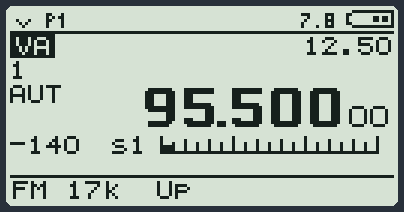
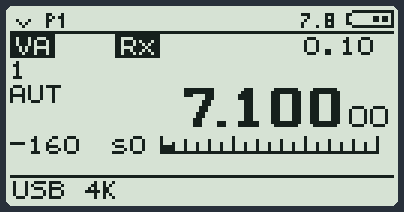
Below 18 MHz the radio uses the Si4732 board by itself. Between 18 and 30 MHz you choose with F and 8: on the screen you read HF (Si4732 board) or BK (the normal receiver).
When you listen with the board, three menu items change name and values. The quick keys stay the same.
| Item | Quick key | What you choose |
|---|---|---|
| SI Mode | 0 held down | AM for shortwave radio stations, LSB and USB for radio amateurs (sideband). |
| SI BW | 5 held down | The width of the filter, in kHz. Narrow for sideband, wide for music. |
| RFGain | 4 held down | How much to weaken the signal, from +0dB to -60dB. |
| Message | It means |
|---|---|
| PLEASE WAIT | The first time you choose sideband the radio prepares the board. It takes a few seconds. |
| NO SSB PATCH | A file that comes together with the modules is missing. The radio receives in AM. Do MODULES ONLY again with the Si4732 base chosen. |
| NO SI4732 | The board does not answer: it is not there, or you chose the wrong base. The radio works with the normal receiver. |
If you hear nothing
| Check | What to do |
|---|---|
| The squelch | Lower it, or try the monitor (side key 1 held down). If it is on NO RX that VFO never makes a sound. |
| The sub-tone for receiving | If RxCTCS or Rx DCS are on, you hear only those who send that tone. Set them to OFF. See Repeaters and sub-tones. |
| The mode | An AM signal listened to in FM cannot be understood, and the other way round. |
| The bandwidth | Too narrow: the voice comes out choked or disappears. |
| The gain | If Rx AGC is on MAN and RFGain is low, you cannot hear weak signals. Set AUTO again. |
| The volume knob | It happens to everyone. |