If something goes wrong
The warning messages and what to do
RELOAD RADIOMANAGER
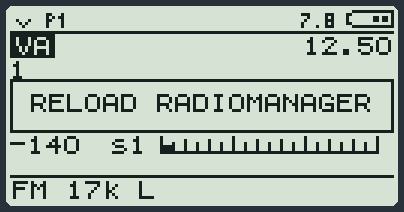
The radio has switched on, but it cannot find the modules and the menu tables. It happens if the loading was interrupted (cable unplugged, computer switched off) or right after a flash.
In this state the radio works at the minimum: it listens, transmits with PTT, the arrows change frequency and the monitor works. The menu and the other keys do not.
- Leave the radio on just as it is.
- Connect it to the computer with the USB-C cable.
- Open RadioManager, Firmware 6 page, and press MODULES ONLY.
- When it has finished, the message disappears and the menu comes back.
- If RadioManager says the full flash is needed, do FLASH V6 (radio off, PTT held down, switch on).
The computer does not see the radio
The link with the computer is made by a module called USB. It comes with the firmware and is always there at power-on: it is the right moment to connect to RadioManager. It has no screen.
For the first 5 minutes after switching on, USB always stays in place. After that, if nobody uses it, it is the first to make room for the other modules (for example FastScan or the scan). Then the computer no longer sees the radio. When you need to connect to RadioManager or another program, turn it on again:
- Press MENU and then 6: you are in the APP group.
- Choose USB with the arrows and press MENU.
- You read USB ON: the socket is on and the computer sees the radio. From that moment it stays in place for at least 5 minutes.
- Or, simpler: switch the radio off and on again.
| What happens | What to do |
|---|---|
| You used the paddle and now the computer no longer sees the radio | This is normal: the paddle disconnects the USB. Put Paddle back on OFF and switch the USB on again as above. |
| You have just used a big module | It may have removed the USB to make room. Switch it on again as above. |
| It has never seen it | Check the cable: it must carry data. Try another socket on the computer. |
| You have to redo the firmware | Boot mode always works: radio off, PTT held down, switch on. |
All the warning messages of the base
| Message | It means |
|---|---|
| NO TX | You cannot transmit here (aircraft band, FM radio, a mode that does not transmit, upconverter on). |
| FREQ BUSY | The channel is busy and BusyCL is on. |
| TIMEOUT | You went over the Tx TOT time. Let go of PTT and press it again. |
| N/A | That function or that module is not in this radio. |
| READ ONLY | That thing cannot be written. |
| RESET | RESET ALL is working. |
| ERR | RESET ALL did not start: the factory data is missing. Nothing was changed. |
| Memory Full | There are no more free memory channels in this bank. |
| Add Mem CH-... | Frequency saved in that memory channel. |
| DEL? *=YES | Do you really want to delete? Press * to say yes. |
| Blacklist #... | Frequency put in the scan blacklist. |
| Already in list | It was already there. |
| Skip Set | The scan will skip this memory channel. |
| SCList Empty | The list is empty. |
| SCList Clear | List emptied. |
| Preset Saved | Preset saved: the VFO onto the chosen preset (F and then MENU in the preset list), or the scan blacklist onto the preset recalled last (F and then * in the SCList list). |
| No Preset | You wanted to save the blacklist onto a preset, but you have not recalled any. |
| SC No Save | I could not save the list in the memory channels. |
| TONE SAVED | Sub-tone saved on the VFO. |
| NO TONE | No sub-tone to save, or the Tone Scan module is missing (or it has not loaded yet: it happens by itself at the first signal in FM). |
| Frequency Error | The frequency you typed is not valid. |
| PLEASE WAIT | The radio is doing a long job: wait. |
| NO SI4732 | You have the base for the Si4732 board but the board does not answer. |
| NO SSB PATCH | A file the Si4732 board needs for SSB is missing: load the modules again with RadioManager. |
| 18-30 MHz | With the Si4732 board: that function works only between 18 and 30 MHz. |
| LOAD TIMEOUT | The computer stopped sending data halfway. Do MODULES ONLY again. |
| LOAD STOPPED | You stopped the loading with EXIT. |
RESET: putting everything back as from the factory
In the SYS menu the item RESET has two choices. They are very different: read carefully before you press.
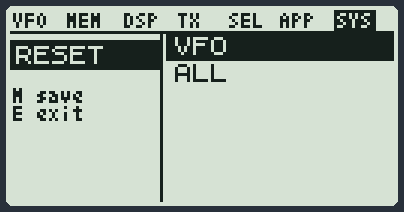
| Choice | What it does | What it does NOT touch |
|---|---|---|
| VFO | Resets the three VFOs: they go back to FM, with the basic values, on 145.000 MHz (A and C) and 433.000 MHz (B). You go back to VFO A. | The memory channels, the presets and all the settings. |
| ALL | Brings the radio back to how it was with the firmware just installed. All the settings and the calibration go back to the factory ones: also the presets, the contact list and the texts (callsign, codes, position). All the memory channels are erased: only the seven sample channels come back in the first bank. RESET appears on the screen for a few seconds, then the radio restarts by itself. It is useful when the radio behaves strangely because some value has been damaged, or when you want to start again from scratch. | The modules you loaded. |
- Press MENU, then 7, and go to the RESET item.
- Press MENU and choose VFO or ALL with the arrows.
- Press MENU to do it. EXIT to drop it.
| Message | It means |
|---|---|
| RESET | It is working: do not switch the radio off. If it switches off anyway, it is not serious: switch it on again and do the RESET again. |
| ERR | The radio cannot find the factory data: it changed nothing. Load the modules again with RadioManager (MODULES ONLY) and try again. |
Putting a VFO right
If a VFO behaves strangely (you hear nothing, wrong mode), hold down EXIT on the main screen: that VFO goes back to FM with the basic values. The frequency stays.
For those coming from V5
| In V5 | In V6 |
|---|---|
| The module items appear only with the module | They are always there. |
| The beacon is set from the menu (BeaTime, BeaMode) | You turn it on and set it from the screen of the Beacon module. |
| CW Spd is typed with the digits | You choose it with the arrows. |
| Key and paddle also on the side socket | Only on the USB-C socket. |
| A refused transmission says nothing | NO TX, FREQ BUSY or TIMEOUT appears. |
| Preset is in the APP group | It is in the MEM group, and you need the Preset module. |
| Upconverter CUSTOM: you can transmit | With the upconverter on you can never transmit. |